Azure Policy Mystery: Compute Baseline Applies to Windows 11 MultiSession, Not to Windows 11 Enterprise

It’s been a busy few months over here. With CMMC preparation in full swing, it’s been all about making sure our controls are defensible and our evidence holds up. I typically start from a NIST 800-171 rev.2 baseline so I’ve got a strong foundation to build on for compliance.

While reviewing my Azure Policy posture, I noticed something odd:

  • My AVD Windows 11 multi-session deployments were coming back Compliant.
  • But some test Windows 11 Enterprise VMs showed Not applicable for the guest configuration results.
  • Even more confusing: Azure Policy still appeared to report those Windows 11 Enterprise VMs as Compliant at the policy level.

That mismatch (“Compliant” vs “Not applicable”) is exactly the kind of thing that can cause confusion, or worse, show up during an audit.

What the baseline content says (MOF filters)

My first gut reaction was to look at what the baseline was actually doing. The Windows baseline content uses filters to decide whether a given rule should be evaluated. In the MOF you’ll see both a ServerTypeFilter and an OSFilter, for example:

	ServerTypeFilter = "ServerType = [Domain Controller, Domain Member, Workgroup Member]";
	OSFilter = "OSVersion = [WS2008, WS2008R2, WS2012, WS2012R2, WS2016]";

At face value, that OS filter reads like “Windows Server only” targeting (the WS* values).

What the Guest Configuration agent logs show

Next I went to the Guest Configuration agent logs:

C:\ProgramData\GuestConfig\gc_agent_logs

On the Windows 11 Enterprise VM, the logs clearly show the engine skipping rules due to OS filtering:

Message : [win11ent]: [Audit Other Object Access Events] Not evaluating rule because it was filtered due to OS version
[2025-12-26 17:23:21.749] [PID 7840] [TID 9292] [DSCEngine] [WARNING] ...

On the Windows 11 multi-session VM, the same type of check was actually being processed:

ResourceID: Audit Other Object Access Events
Message : [win11multi]: LCM:  [ Start  Get ]  [Audit Other Object Access Events]
[2025-12-26 17:21:03.877] ... Invoking resource method 'GetTargetResource' ... class name 'ASM_AuditPolicy'

So in my case:

  • Win11 Enterprise: rules get filtered “Not applicable”
  • Win11 multi-session: rules run produces compliance results

Compare OS SKU signals (including ProductType)

To compare what Windows reports about each OS, you can pull basic OS info like this:

Get-CimInstance Win32_OperatingSystem |
  Select-Object Caption, Version, BuildNumber, ProductType

Microsoft documents Win32_OperatingSystem.ProductType as: Microsoft Learn

  • Work Station (1)
  • Domain Controller (2)
  • Server (3)

This is useful context when you’re trying to understand how a configuration engine might be classifying a machine at evaluation time. (It doesn’t prove which internal mapping the baseline uses, but it’s an easy, consistent signal to capture as evidence.)


The documentation clue: this baseline isn’t intended for Windows 10/11

The big “aha” for me was in Microsoft’s baseline reference documentation. The Windows guest configuration baseline documentation explicitly states:

Azure Policy guest configuration only applies to Windows Server SKU and Azure Stack SKU. It does not apply to end user compute like Windows 10 and Windows 11 SKUs. Microsoft Learn

That statement lines up perfectly with why Windows 11 Enterprise would return Not applicable.

What didn’t line up (and what prompted the deeper dive) was why Windows 11 multisession was still producing evaluated results in my environment.

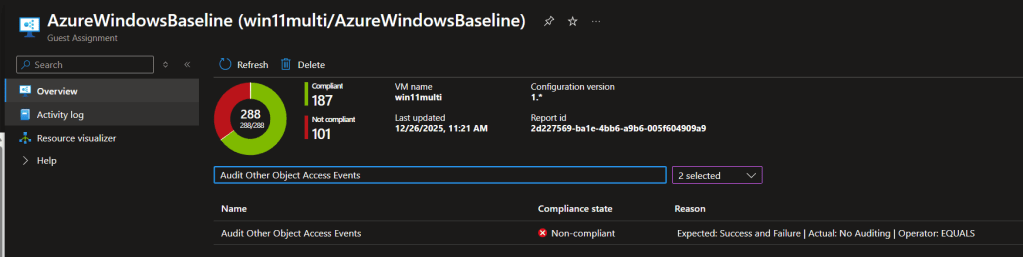
To drive the point of confusion home even futher, let’s take a look at the Guest Assignment. We can see the multi session OS is working, but the Enterprise image is showing compliant, but not applicable to that OS.
Closing the loop with Microsoft support

To close the case, I opened a ticket with Microsoft and shared:

  • the MOF filter behavior,
  • the Guest Configuration agent logs showing OS version filtering on Win11 Enterprise,
  • and the fact that Win11 multisession was still evaluating rules.

Support escalated to product and confirmed (for my scenario) that the baseline behavior I was seeing was expected, and that documentation updates were planned to make this clearer where it works with the multi session OS, but not the Enterprise OS.

Takeaway: don’t assume “Compliant” means “evaluated.” “For audit prep, verify applicability and keep a record of what the agent actually assessed, especially when you’re mixing Windows 11 Enterprise and Windows 11 multi-session in the same compliance scope.

Azure Windows Security Baseline

I was designing a deployment around Azure Virtual Desktop utilizing Azure Active Directory, not AADDS or ADDS and when checking a test deploy for compliance against the NIST 800-171 Azure Policy, it showed the Azure Baseline is not being met. In a domain, I wouldn’t worry since group policy will fix this right up, but what about non domain join? What about custom images? Yeah, I guess we could manually set everything then image it, but I prefer a clean base then apply configuration during my image build. Let’s take a look how to hit this compliance checkbox.

I recalled that Microsoft released STIG templates and found the blog post Announcing Azure STIG solution templates to accelerate compliance for DoD – Azure Government (microsoft.com). I was hoping their efforts would make my life a little bit easier, but after a test deploy, I saw 33 items still not in compliance.

Looking at the workflow, it is ideally how i’d like my image process to look in my pipeline.

Deploy a baseline image, apply some scripts and then I can generate a custom image to a shared gallery for use. I didn’t want to reinvent the wheel, so I started researching if anyone has done this already. I found a repo https://github.com/Cloudneeti/os-harderning-scripts/ that looked promising, but it was a year old and I noticed some things incorrect with the script such as incorrect registry paths, commented out DSC snippets, etc. This did do a good bulk, but just needed cleaned up and things added. Looking at the commented code, it was around user rights assignments. Now, the DSC module for user right assessments is old and I haven’t seen a commit in there for years. Playing around, it seems that some settings can not be set. I didn’t want to hack together stuff using secedit, so I found a neat script https://blakedrumm.com/blog/set-and-check-user-rights-assignment/ that I could just pass in the required rights and move on. Everything worked except for SeDenyRemoteInteractiveLogonRight. When the right doesn’t exist in the exported config, it couldn’t add it. So, I just wrote the snippet to add the last right.


$tempFolderPath = Join-Path $Env:Temp $(New-Guid)
New-Item -Type Directory -Path $tempFolderPath | Out-Null
secedit.exe /export /cfg $tempFolderPath\security-policy.inf


#get line number
$file = gci -literalpath "$tempFolderPath\security-policy.inf" -rec | % {
$line = Select-String -literalpath $_.fullname -pattern "Privilege Rights" | select -ExpandProperty LineNumber
}

#add string
$fileContent = Get-Content "$tempFolderPath\security-policy.inf"
$fileContent[$line-1] += "`nSeDenyRemoteInteractiveLogonRight = *S-1-5-32-546"
$fileContent | out-file "$tempFolderPath\security-policy.inf" -Encoding unicode

secedit.exe /configure /db c:\windows\security\local.sdb /cfg "$tempFolderPath\security-policy.inf"
rm -force "$tempFolderPath\security-policy.inf" -confirm:$false

After running PowerShell DSC and script, the Azure baseline comes back fully compliant. I have tested this on Windows Server 2019 and Windows 10.

You can grab the files in my repo https://github.com/jrudley/azurewindowsbaseline

Guest Configuration Extension Broke in Azure Gov for RHEL 8.x+

UPDATE 4/11/2022 This has been fixed!

UPATE 4/3/2022 Still broke…waiting on product to fix.

UPDATE 3/4/2022 Microsoft product group will be pushing a fix out in 2 weeks to Azure Gov. I asked what the cause was, but nothing yet.

One of the great features of Azure Policy is the capability to audit OS settings for security baselines and compliance checking. I was deploying RHEL 8.4 and noticed the Guest Assignment was always hung in the pending state. I had no issues with Ubuntu, so it had to be something happening on the RHEL vm.

I navigated to /var/lib and saw the GuestConfig folder created, but when I was inside, it was empty. Hrm, this should be populated with folders and MOF files.

[root@rhel84 GuestConfig]# pwd
/var/lib/GuestConfig
[root@rhel84 GuestConfig]# ls -al
total 4
drwxr--r--.  2 root root    6 Feb 26 22:13 .
drwxr-xr-x. 41 root root 4096 Feb 26 22:13 ..

Next step was to tail the messages log to see if anything can pin point what is actually happening.

[root@rhel84 GuestConfig]# tail -f /var/log/messages | grep -i GuestConfiguration
Feb 26 22:27:36 rhel84 systemd[7442]: gcd.service: Failed at step EXEC spawning /var/lib/waagent/Microsoft.GuestConfiguration.ConfigurationforLinux-1.25.5/GCAgent/GC/gc_linux_service: Permission denied
Feb 26 22:27:46 rhel84 systemd[7458]: gcd.service: Failed at step EXEC spawning /var/lib/waagent/Microsoft.GuestConfiguration.ConfigurationforLinux-1.25.5/GCAgent/GC/gc_linux_service: Permission denied

Alright, a permission denied. It’s something to start looking into, but I was confused why this is happening. I headed over to Azure commercial and spun up a RHEL 8.4 vm with the same Azure Policy to execute my security baseline. Well, to my surprise, everything worked just fine. Looking at /var/lib/GuestConfig showed the Configuration folder with mof files. Looking at the Guest Assignments, it was showing NonCompliant, so I know it is OK there. I did notice the Guest Extension in commercial is using 1.26.24 and gov is using 1.25.5. I tried deploying that version with no auto upgrade in gov, but same error.

After some research, I set selinux to permissive mode and instantly the Configuration folder was created and starting pulling the mof files down. OK, now I am really puzzled. Working with Azure support, they were able to reproduce this same issue in Gov, but not in commercial. I was shocked no other cases have been open. I am not sure when this problem started happening, but this means security baselines on RHEL 8.x+ are not working.

While I wait for Microsoft to investigate more why this is happening, I tried to find a workaround. Knowing it is selinux causing the issue, I thought I could just create a policy allowing the execution of the gc_linux_service.

I tested first by making sure selinux is set to Enforcing then using chcon to set the selinux context:

[root@rhel84 GuestConfig]# getenforce
Enforcing
chcon -t bin_t /var/lib/waagent/Microsoft.GuestConfiguration.ConfigurationforLinux-1.25.5/GCAgent/GC/gc_linux_service

We’re all good. No error’s in the messages log. Since this could revert by a restorecon command being ran later, I added it to the selinux policy by running:

semanage fcontext -a -t bin_t /var/lib/waagent/Microsoft.GuestConfiguration.ConfigurationforLinux-1.25.5/GCAgent/GC/gc_linux_service
restorecon -v /var/lib/waagent/Microsoft.GuestConfiguration.ConfigurationforLinux-1.25.5/GCAgent/GC/gc_linux_service

I will update my post once Microsoft comes back with a reason why this is only happening in Azure Gov and see what proposed solution they have. For now, i’d not depend on the Guest Extension to perform your compliance checking for RHEL 8.x until a fix has been pushed.