
I encountered a scenario where I needed to use PowerShell 7’s foreach parallel feature to significantly reduce processing time. However, my hybrid worker VMs did not have PowerShell 7 installed. I installed the latest version, 7.2, and started the runbook worker with a PS7 job, but it just hung in the queued state. Time to investigate…
Since we’re all using extension-based hybrid workers (as the agent is being phased out), you need a system variable called POWERSHELL_7_2_PATH set to the location of your pwsh.exe. I verified that this variable was set correctly.
Looking at the job logs on the hybrid worker VM, it showed the following error:
Orchestrator.Sandbox.Diagnostics Critical: 0 : [2024-07-18T21:05:45.3704708Z] An unhandled exception was encountered while handling the job action. The sandbox will terminate immediately. [jobId=54d069c4-a986-4e59-a22f-effd94a83c5b][source=Queue][exceptionMessage=System.InvalidOperationException: Runbook type '17' not supported.Runbook type ’17’ not supported? There was no information on the Microsoft site about requirements beyond setting the environment variable. Their troubleshooting page also lacked relevant information. When I ran a PS7 command on the VM, it worked perfectly, but the job still hung in the hybrid worker. This suggested an issue with the extension. My current extension version was 1.1.11.
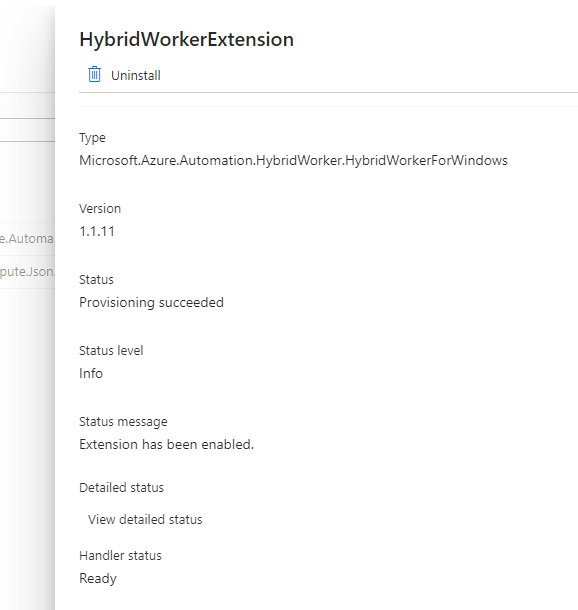
I wished for a changelog, but alas, that would be too easy. To list the available versions of the extension, run the following command:
az vm extension image list-versions --publisher 'Microsoft.Azure.Automation.HybridWorker' --location <region> --name 'HybridWorkerForWindows'This showed versions 1.1.12 and 1.1.13 available. But why didn’t the 1.1.11 extension auto-upgrade? Odd. The following command upgrades the extension:
Set-AzVMExtension -ResourceGroupName <rg> -Location <region> -VMName <vmName> -Name "HybridWorkerExtension" -Publisher "Microsoft.Azure.Automation.HybridWorker" -ExtensionType HybridWorkerForWindows -TypeHandlerVersion 1.1 -Settings $settings -EnableAutomaticUpgrade $trueNote that the documentation mentions a parameter called -Settings, but doesn’t specify what it should be. I omitted it, and the command still upgraded my extension to the latest version.
After the upgrade, my PS7 job worked flawlessly. Cheers!
 Azure Testing Site